卻發現程式一直都無法正確執行
後來網路上找到資料,原來是 Windows 與 Linux 的換行字元不同所導致.......
這時候就必須要修改一下編輯器的設定了!
以 MadEdit 為例:

將換行字元改為 Unix,程式就可以正常執行啦!
參考資料
#!/bin/sh

myvar="Hi there"

echo $myvar
echo "$myvar"
echo '$myvar'   #使用單引號就不會印出變數內容
echo $myvar    #escape

echo Enter some text
read myvar

echo '$myvar' now equals $myvar
exit 0

# ========== 執行結果 ==========
# Hi there
# Hi there
# $myvar
# $myvar
# Enter some text
# Hello World!    <== 這個部分是使用者輸入的
# $myvar now equals Hello World!
| Environment Variables | 描述 | 範例 |
| $HOME | 使用者家目錄 | /home/godleon |
| $PATH | PATH 設定(由冒號所隔開) | /usr/local/sbin:/usr/local/bin:/usr/sbin:/usr/bin:/sbin:/bin:/usr/games |
| $PS1 | 命令提示字元 | ${debian_chroot:+($debian_chroot)}\u@\h:\w\$ |
| $PS2 | 命令提示字元 | > |
| $IFS | 用來隔開輸入參數的字元,通常為 space、tab 或 newline | |
| $0 | shell 的名稱 | -bash |
| $# | 傳入參數的數量 | 2 |
| $$ | shell script 所屬的 process ID | 5465 |
| Parameter Variables | 描述 | 範例 |
| $1, $2, ...... | 傳入的參數 | para1, para2, ..... |
| $* | 所有傳入的參數,以 $IFS 隔開 | para1 para2 para3 (假設 $IFS 為一個 space) |
| $@ | 所有傳入的參數,不過並非由 $IFS 隔開,而是用一個 space 作間隔 | para1 para2 para3 |
#/bin/bash

salutation="Hello"
echo $salutation

echo "The program $0 is now running"        # $0 (shell script 名稱)
echo "The second parameter was $2"          # $2 (第二個參數)
echo "The first parameter was $1"           # $1 (第一個參數)
echo "The parameter list was $*"            # 參數列表
echo "The user's home directory is $HOME"   # 家目錄
echo "Please enter a new greeting"
read salutation     # 讀取使用者的輸入

echo $salutation
echo "The script is now complete"
exit 0

# ========== 執行結果 ==========
# Hello
# The program try_var.sh is now running
# The second parameter was two
# The first parameter was one
# The parameter list was one two
# The user home directory is /home/godleon
# Please enter a new greeting
# Hello Bash Shell
# Hello Bash Shell
# The script is now complete
| String Comparison | 結果 |
| str1 = str2 | True,若 str1 等於 str2 |
| str1 != str2 | True,若 str1 不等於 str2 |
| -n str | True,若 str 不為 null |
| -z str | True,若 string 為 null 或空白字串 |
| Arithmetic Comparison | 結果 |
| exp1 -eq exp2 | True,若兩個結果相同 |
| exp1 -ne exp2 | True,若兩個結果不相同 |
| exp1 -gt exp2 | True,若 exp1 大於 exp2 |
| exp1 -ge exp2 | True,若 exp1 大於等於 exp2 |
| exp1 -lt exp2 | True,若 exp1 小於 exp2 |
| exp1 -le exp2 | True,若 exp 小於等於 exp2 |
| ! exp | True,若 exp 為 false |
| File Conditional | 結果 |
| -d file | True,若檔案為目錄 |
| -e file | True,若檔案存在 |
| -f file | True,若檔案為一般檔案 |
| -g file | True,若檔案有設定 set-gid |
| -r file | True,若檔案可讀取 |
| -s file | True,或檔案大小不為 0 |
| -u file | True,若檔案有設定 set-uid |
| -w file | True,若檔案可寫入 |
| -x file | True,若檔案可執行 |
#!/bin/bash

if [ -f /bin/bash ]
then
    echo "file /bin/bash exists"
fi

if [ -d /bin/bash ]
then
    echo "/bin/bash is a directory"
else
    echo "/bin/bash is not a directory"
fi

# ========== 執行結果 ==========
# file /bin/bash exists
# /bin/bash is not a directory
#!/bin/bash

echo "Is it morning? Please answer yes or no"
read timeofday

if [ $timeofday = "yes" ]
then
    echo "Good morning"
elif [ $timeofday = "no" ]; then    # 請注意此處,必須加上分號以及另外一個 then 喔!
    echo "Good afternoon"
else
    echo "sorry, $timeofday not recongnized. Enter yes or no"
    exit 1
fi

exit 0
#!/bin/bash

# 會將 $(ls *sh) 的結果,以 space 為間隔印出
for file in $(ls *.sh);
do
    echo $file
done
exit 0
#!/bin/bash

echo "Enter password"
read trythis

while [ $trythis != "secret" ];
do
    echo "sorry, try again"
    read trythis
done
exit 0
#!/bin/bash

# 無使用者登入
until who | grep $1 > /dev/null
do
    sleep 60
done

# 偵測到使用者登入
echo "$1 has just logged in"
exit 0
#!/bin/bash

echo "Is it morning? Please answer yes or no"
read timeofday

case "$timeofday" in
    yes)
        echo "Good morning";;   # 每個 statement 結束都必須用兩個分號
    no)
        echo "Good afternoon";;
    y)
        echo "Good morning";;
    n)
        echo "Good afternoon";;
    *)
        echo "sorry, answer not recongnized";;
esac
exit 0
#!/bin/bash

echo "Is it morning? Please answer yes or no"
read timeofday

case "$timeofday" in
    yes | y | Yes | YES)    # 可用 regular expression 一次篩選多個條件
        echo "Good morning" # 可執行多個指令
        echo "Ip bright and early this morning"
        ;;   # 每個 statement 結束都必須用兩個分號
    [nN]*)
        echo "Good afternoon";;
    *)
        echo "sorry, answer not recongnized"
        echo "Please answer yes or no"
        exit 1
        ;;
esac
exit 0
#!/bin/bash

touch file_one
rm -f file_two

# AND 的用法
if [ -f file_one ] && echo "hello" && [ -f file_two ] && echo " there"
then
    echo "in if(and)"
else
    # 由於 file_two 已經刪除,因此執行到此處
    echo "in else(and)"
fi

# OR 的用法
if [ -f file_one ] || echo "hello" || echo " there"
then
    # 執行到此處,因為 -f file_one 為 true
    echo "in if(or)"
else
    echo "in else(or)"
fi
exit 0
有回傳值的使用範例:#!/bin/bash
sample_text="global variable" # 全域變數
foo() {
local sample_text="local variable" # 定義為區域變數
echo "Function foo is executing"
echo $sample_text # 區域變數
}
echo "script starting"
echo $sample_text # 全域變數
foo
echo "script ended"
echo $sample_text # 全域變數
exit 0
#!/bin/bash

# function 的宣告中不會帶參數,必須在呼叫時帶入
yes_or_no() {
    echo "Is your name $* ?"    # 印出帶入的參數
    while true
    do
        echo -n "Enter yes or no: "
        read x
        case $x in
            y | yes)
                return 0;;  # 0 表示回傳 true
            n | no)
                return 1;;  # 1 表示回傳 false
            *)
                echo "Answer yes or no"
        esac
    done
}

echo "Original parameter are $*"

if yes_or_no "$1"   # 帶入第一個參數
then
    echo "Hi $1, nice name"
else
    echo "never mind"
fi
exit 0
#!/bin/bash

rm -rf fred*
echo > fred1
echo > fred2
mkdir fred3
echo > fred4

for file in fred*
do
    if [ -d $file ]
    then
        break;  # 效果同 C 語言中的 break
    fi
done

echo "first directory starting fred was $file"

rm -rf fred*
exit 0
# ========== dot.sh ==========
#!/bin/bash

PS2="###"
exit 0


# ========== 執行結果 ==========
# 原本的 $PS2
# shell> echo $PS2
# >

# 一般執行方式
# shell> sh dot.sh
# shell> echo $PS2  # 進入 sub shell 執行,因此還是沒有修改到 parent shell 中的設定
# >

# 以 dot 方式來執行
# shell> . dot.sh
# shell> echo $PS2
# ###
#!/bin/bash

foo=10
x=foo
y='$'$x
echo $y     # 輸出 => $foo

# 使用 eval 來處理(類似 * 將 pointer 所代表的值提取出來的功能)
eval y='$'$x
echo $y     # 輸出 => 10
# ==================== export1.sh ====================
#!/bin/bash

foo="The first meta-syntactic variable"
export bar="The second meta-syntactic variable"	# export 後即為環境變數

sh export2.sh


# ==================== export2.sh ====================
#!/bin/bash

echo $foo
echo $bar   # 只有此行會顯示出內容,因為經過 export
| 敘述 | 作用 |
| expr1 | expr2 | 若 expr 不為 0,則回傳 expr1;反之回傳 expr2 |
| expr1 & expr2 | 或兩者任何一個為 0,則回傳 0;反之回傳 expr1 |
| expr1 = expr2 | 判斷是否相同 |
| expr1 > expr2 | 判斷 expr1 是否大於 expr2 |
| expr1 >= expr2 | 判斷 expr 是否大於等於 expr2 |
| expr1 < expr2 | 派斷 expr1 是否小於 expr2 |
| expr1 <= expr2 | 判斷 expr1 是否小於等於 expr2 |
| expr1 != expr2 | 判斷 expr1 是否不等於 expr2 |
| expr1 + expr2 | 回傳兩者相加的結果 |
| expr1 - expr2 | 回傳兩者相減的結果 |
| expr1 * expr2 | 回傳兩者相乘的結果 |
| expr1 / expr2 | 回傳兩者相除的結果 |
| expr1 % expr2 | 回傳餘數 |
# x++
x = `expr $x + 1`
x = $(expr $x + 1)
shell> printf "%sn" Hello
Hello
shell> printf "%s %dt%s" "Hi there" 15 people
Hi there 15 people
#!/bin/bash

echo the date is $(date)

# 設定參數(以 space 為區隔)
set $(date)

# 取第二個參數
echo The month is $2

exit 0


# ========== 執行結果 ==========
# shell> sh set.sh
# the date is 二 2月 26 15:10:00 CST 2008
# The month is 2月
#!/bin/bash

while [ "$1" != "" ]
do
    echo $1
    # $2->$1  $3->$2  $4->$3
    shift
done

exit 0


# ========== 執行結果 ==========
# shell> sh shift.sh 1 2 3
# 1
# 2
# 3
| 訊號 | 描述 |
| HUP (1) | Hang up (通常在 terminal 離線或使用者登出時會送出此類訊號) |
| INT (2) | Interrupt (按下 Ctrl + C) |
| QUIT (3) | Quit (按下 Ctrl + \) |
| ABRT (6) | Abort (通常程式執行發生嚴重錯誤時會送出此類訊號) |
| ALRM (14) | Alarm (通常用來處理逾時之用) |
| TERM (15) | Terminate (通常當機器要關機時,由系統送出) |
#!/bin/bash

#若接收到 interrupt 的訊號,以下的命令就會執行
trap 'rm -f /tmp/my_tmp_file_$$' INT

echo creating file /tmp/my_tmp_file_$$
date > /tmp/my_tmp_file_$$

echo "press interrupt (Ctrl+C) to interrupt ...."
while [ -f /tmp/my_tmp_file_$$ ]
do
    echo File exist
    sleep 1
done
echo The file no longer exists

#即使接收到 interrupt 的訊號,檔案也不會被刪除
trap INT
echo creating file /tmp/my_tmp_file_$$
date > /tmp/my_tmp_file_$$

#因此此處會進入無限回圈
echo "press interrupt (Ctrl+C) to interrupt ...."
while [ -f /tmp/my_tmp_file_$$ ]
do
    echo File exist
    sleep 1
done

echo we never get here
exit 0


# ========== 執行結果 ==========
# shell> sh trap.sh
# creating file /tmp/my_tmp_file_10581
# press interrupt (Ctrl+C) to interrupt ....
# File exist
# File exist
# File exist    <=== 此處按下 Ctrl + C
# The file no longer exists
# creating file /tmp/my_tmp_file_10581
# press interrupt (Ctrl+C) to interrupt ....
# File exist
# File exist
# File exist    <=== 此處按下 Ctrl + C
#!/bin/bash

foo="Hello World"
echo $foo

# unset 後,foo 變數就不存在了
unset foo
echo $foo


# ========== 執行結果 ==========
# shell> sh unset.sh
# Hello World
# (此處為空白)
# 將 ls -al 所產生的訊息輸出至檔案 lsoutput.txt 中(檔案內容會被覆蓋)
shell> ls -al > lsoutput.txt
# 將 ls -al 所產生的訊息附加至檔案 lsoutput.txt 中
shell> ls -al >> lsoutput.txt
# 使用可能會產生錯誤訊息的指令(例如 kill)
# 將 standard output 輸出至檔案 killout.txt 中
# 將 standard error 輸出至檔案 killerr.txt 中
shell> kill -HUP 1234 >killout.txt 2>killerr.txt
# 將 standard output & error 輸出到同一個檔案中
shell> kill -1 1234 >killouterr.txt 2>&1
# 不保留任何 standard output & error 相關訊息
shell> kill -1 1234 >/dev/null 2>&1
# 將 mydata.txt 檔案中的內容透過 more 指令呈現 (standard input)
shell> more < mydata.txt
# (1) 取得 ps 相關資訊
# (2) 排序後將結果存入檔案 pssort.txt 中
shell> ps | sort > pssort.txt
# (1) 取得 ps 相關資訊
# (2) 排序
# (3) 使用 more 來展示
shell> ps | sort | more
# (1) 取得 ps 相關資訊
# (2) 排序
# (3) 過濾掉重複的 process name
# (4) 清除名稱為 sh 的 process
# (5) 使用 more 來展示
shell> ps -xo comm | sort | uniq | grep -v sh | more
# (1) 使用 cat 讀取 mydata.txt 的內容
# (2) 將內容進行排序
# (3) 過濾掉重複的資料,並將結果存回 mydata.txt 中
shell> cat mydata.txt | sort | uniq > mydata.txt
另外設計一支程式,使用到上面所定義的 function:// ==================== fred.c ====================
#include <stdio.h>
void fred(int arg) {
printf("fred: we passed %d\n", arg);
} //end fred
// ==================== bill.c ====================
#include <stdio.h>
void bill(char *arg) {
printf("bill: we passed %s\n", arg);
} //end bill
接著是編譯的方式,有幾種方式可以進行編譯:// ==================== program.c ====================
#include <stdlib.h>
#include "lib.h"
int main(void) {
bill("Hello World!");
exit(0);
} //end main
# (1) 直接將主程式與 function file 一同編譯其中第三種是比較標準的作法,不過其實 gcc 的功能很強,所以在編譯的時候可以省略一些指令卻可以達到相同效果。
shell> gcc -o program program.c bill.c
# (1) 將定義兩個 function 的檔案編譯成 object file
# (2) 將主程式與 object file 一同進行編譯
shell> gcc -c fred.c bill.c ; gcc -o program program.c bill.o
# (1) 將定義兩個 function 的檔案編譯成 object file
# (2) 產生 static library (archive)
# (3) 將主程式與 static library 一同進行編譯
shell> gcc -c fred.c bill.c ; ar -crv libfoo.a fred.o bill.o ; gcc -o program program.c libfoo.a
# (1) 將定義兩個 function 的檔案編譯成 object file
# (2) 產生 static library (archive)
# (3) 將主程式與 static library 一同進行編譯(-L 指定 library directory、-l 指令所要用的 library name)
shell> gcc -c fred.c bill.c ; ar -crv libfoo.a fred.o bill.o ; gcc -o program program.c -L. -lfoo
shell> ldd program
linux-gate.so.1 => (0xffffe000)
libc.so.6 => /lib/tls/i686/cmov/libc.so.6 (0xb7e89000) # 需求 libc.so 這個 shared library
/lib/ld-linux.so.2 (0xb7fdf000)
if condition
then
statements
[elif condition
then statements...]
[else
statements]
fi
if command ran successfully
then
normal processing
else
error processing
fi
filename=$1
word1=$2
word2=$3
if grep $word1 $filename || grep $word2 $filename
then
  echo "$word1 or $word2 is in $filename."
fi
| Operator | 成立條件 |
| str1 = str2 | 這不多解釋了.... |
| str1 != str2 | 這不多解釋了.... |
| str1 < str2 | 這不多解釋了.... |
| str1 > str2 | 這不多解釋了.... |
| -n str1 | 當 str1 不為 null 時 |
| -z str1 | 當 str1 為 null 時(長度為 0) |
| Operator | 成立條件 |
| -a file | 檔案存在 |
| -d file | 檔案存在,並且是個目錄 |
| -e file | 檔案存在 |
| -f file | 檔案存在,且為一般檔案(非目錄或其他特殊型態) |
| -r file | 目前的使用者有讀取檔案的權限 |
| -s file | 檔案存在且內容非空白 |
| -w file | 目前的使用者有寫入檔案的權限 |
| -x file | 目前的使用者有執行檔案(or 進入目錄)的權限 |
| -N file | 檔案自從上一次被讀取後,有被修改過 |
| -O file | 檔案的 owner 為目前的使用者 |
| -G file | 檔案的 group 為目前使用者所屬之 group |
| file1 -nt file2 | file1 比 file2 的日期新 |
| file1 -ot file2 | file1 比 file2 的日期舊 |
if [ condition ] && [ condition ]; then當然也可以跟 Exit Status 結合,就會變成類似以下的格式:
if command && [ condition ]; then以下來段簡單的程式(節錄自書):
當然,兩兩比較一定會有數字的比對,以下介紹數字比較的方式:# 檢查檔案是否不存在
if [ ! -e "$1" ]; then
echo "file $1 does not exist."
exit 1
fi
# 檢查是否為目錄
if [ -d "$1" ]; then
echo -n "$1 is a directory that you may "
if [ ! -x "$1" ]; then
echo -n "not "
fi
echo "search."
elif [ -f "$1" ]; then # 檢查是否為檔案
echo "$1 is a regular file."
else # 檢查是否為特殊型態的檔案
echo "$1 is a special type of file."
fi
# 檢查目前使用者是否為 owner
if [ -O "$1" ]; then
echo 'you own the file.'
else
echo 'you do not own the file.'
fi
# 檢查是否有讀取檔案的權限
if [ -r "$1" ]; then
echo 'you have read permission on the file.'
fi
# 檢查是否有寫入檔案的權限
if [ -w "$1" ]; then
echo 'you have write permission on the file.'
fi
# 檢查第一個參數是否有執行的權限,且非目錄
if [ -x "$1" -a ! -d "$1" ]; then
echo 'you have execute permission on the file.'
fi
| Keyword | 效果 |
| -lt | Less than (小於) |
| -le | Less then or equal (小於或等於) |
| -eq | Equal (等於) |
| -ge | Greater than or equal (大於或等於) |
| -gt | Greater than (大於) |
| -ne | Not equal (不等於) |
for name [in list ]其實說穿了,使用方式就跟其他程式語言中的 for each 是差不多相同的,以下結合 if/else 判斷來個範例程式:
do
statements that can use $name...
done
#!/bin/bash
IFS=":"
for dir in $PATH
do
  if [ -z "$dir" ]; then
      dir="."
  fi

  if ! [ -e "$dir" ]; then
      echo "${dir} doesn't exist"
  elif ! [ -d "${dir}" ]; then
      echo "${dir} diesn't a directory"
  else
      ls -ld $dir
  fi
done
有興趣知道輸出結果的,可以 copy 回去自己試試看。echoDir() {
chrTab="${chrTab}t"
cd $1
for eachFilePath in $(ls)
do
if [ -d $eachFilePath ]; then
echo -e ${chrTab}${eachFilePath}
echoDir $eachFilePath
fi
done
cd ..
chrTab=${chrTab%'t'}
}
filePath=$1
chrTab=""
if [ -d $1 ]; then
cd $1
for eachFilePath in $(ls)
do
if [ -d $eachFilePath ]; then
echo $eachFilePath
echoDir $eachFilePath
fi
done
cd ..
fi
case expression in以下用個簡單程式來說明:
pattern1 )
statements ;;
pattern2 )
statements ;;
...
esac
for filename in "$@"; do
  case $filename in
      *.jpg | *.png ) echo "may be jpg or png" ;;
      *.tga ) echo "tga" ;;
      *.xpm ) echo "xpm" ;;
      * ) echo "can not identified file type."
  esac
done
select name [in list ]透過 select 語法,可以將 list 中的內容變成一個個的數字選項供使用者選擇,並且有兩個變數需要注意到,分別是 $name 以及 $REPLY;其中 $name 變數的值為選項的內容,而 $REPLY 的值則是選項所代表的數字。
do
statements that can use $name...
done
至於 select 要如何應用在許許多多的管理工作上,就需要管理者發揮創意了!#!/bin/bash
# 指定分隔 $PATH 的字元
IFS=":"
# 變數 PS3 儲存使用 select 時提示使用者的字串
PS3="which path you want to use? "
select mySelect in $PATH;
do
if [ $mySelect ]; then
echo "mySelect = ${mySelect}"
echo "REPLY = ${REPLY}"
else
echo "no such option!"
# 透過關鍵字「break」就可離開了!
break;
fi
done
# 以下是執行結果:
1) /usr/kerberos/sbin 4) /usr/local/bin 7) /usr/sbin
2) /usr/kerberos/bin 5) /sbin 8) /usr/bin
3) /usr/local/sbin 6) /bin 9) /root/bin
which path you want to use? 1
mySelect = /usr/kerberos/sbin
REPLY = 1
which path you want to use? 5
mySelect = /sbin
REPLY = 5
which path you want to use? 10
no such option!
while condition dountil
statements... done
until command ; do statements... done其實說穿了,while 與 until 不過就是一體兩面的用法而已,差別僅在於 while 判斷條件是否為 true,until 判斷條件是否為 false。
until [ cp $1 $2 ];
do
  echo 'Attempt to cpoy failed. waiting...'
  sleep 5
done
這裡僅是簡單用法的介紹,其他就靠大家發揮了!while [ ! cp $1 $2 ];
do
echo 'Attempt to cpoy failed. waiting...'
sleep 5
done
$(指令內容)以下用一些範例來說明:
# 列出目前所在的目錄
echo $(pwd)

# 列出使用者家目錄的檔案
echo $(ls $HOME)

# 列出目前所在目錄下的檔案
echo $(ls $(pwd))

# 檔案中的斷行字元會被移除掉後印出其內容
echo $(< sort_data.txt)
最後,其他更加靈活的使用,就是在於管理者的創意與巧思了!# 顯示目前所有登入 server 的使用者
who
# 取得所有使用者的清單
who | cut -d' ' -f1
# 寄信給他們囉!
mail $(who | cut -d' ' -f1)
| Operator | 作用 | 目的 | 範例 |
| ${varname:-word} | 假如 varname 變數存在,並且不是 null,則回傳變數內容;反之則回傳 word | 用於設定變數預設值 | ${count:-0} 若變數 count 未定義,則回傳 0 |
| ${varname:=word} | 假如 varname 變數存在,並且不是 null,則回傳變數內容;反之則設定此變數的值為 word,再回傳變數的值 | 用於將未定義的變數設定預設值 | ${count:=0} 若變數 count 未定義,則設定 count 變數的值為 0 並回傳 |
| ${varname:?message} | 假如 varname 變數存在,並且不是 null,則回傳變數內容;反之則顯示「varname: message」,並中斷目前的命令或 script。 | 用來針對未定義的變數進行 debug | ${count:?"undefined!"} 若變數 count 未定義,則會顯示「count: undefined!」,並中斷程式執行 |
| ${varname:+word} | 假如 varname 變數存在,並且不是 null,則回傳 word | 用來測試變數是否存在 | ${count:+1} 若變數 count 存在,則回傳 1 |
| ${varname:offset:length} | 回傳 varname 變數的值中,從第 offset 的字元開始(變數值的第一個位置為 0),長度為 length 的字串。 有以下幾種用法:
| 取得變數所儲存字串的部分字串 | count="frogfootman" ${count:4} => footman ${count:4:4} => foot |
8 eight接著要寫一支 script 來根據最前面的數字作排序,並顯示指定的行數:
9 nine
1 one
2 two
3 three
7 seven
5 five
6 six
4 four
0 zero
執行結果如下:#!/bin/bash
# 檔案名稱:highest.sh
# 檢查 file 名稱是否有輸入
fileName=${1:?"filename missing, please check your file."}
# 設定預設顯示的行數
# 若使用者未輸入第二個參數就預設為 5
displayLine=${2:-5}
# sort 是用來排序的程式
# 參數「n」指定以數字為依據作排序
# 參數「r」則是 reverse 的意思,由大排到小
# head 是用來取「前幾行」
sort -nr $fileName | head -$displayLine
# 沒指定檔名時
shell> sh highest.sh
highest.sh: line 5: 1: filename missing, please check your file.
# 未指定所要顯示的行數
shell> sh highest.sh sort-data.txt
9 nine
8 eight
7 seven
6 six
5 five
# 指定顯示行數
shell> sh highest.sh sort-data.txt 3
9 nine
8 eight
7 seven
| Operator | 作用 |
| ${variable#pattern} | 從字串開頭開始比對,當 pattern 符合變數中的值,即不需繼續比對,僅比對至最短的符合字串,刪除比對到的部分並回傳剩下的變數值 |
| ${variable##pattern} | 同上,會回傳刪除比對後的變數值,但所採取的是貪婪比對,會一直比對到最長的部分為止 |
| ${variable%pattern} | 從字串尾端開始比對,當 pattern 符合變數中的值,即不需繼續比對,僅比對至最短的符合字串,刪除比對到的部分並回傳剩下的變數值 |
| ${variable%%pattern} | 同上,會回傳刪除比對後的變數值,但所採取的是貪婪比對,會一直比對到最長的部分為止 |
| ${variable/pattern/string} | 差異處: 在 variable 與 pattern 比對後,在上面的 operator 中,只有第一個比對到的字串會被更換為 string;在下面的 operator 中則會取代所有比對到的字串。 相同處:
|
| ${variable//pattern/string} |
繼續提到上面說的 pattern,有更進階的用法,可以進行多重比對,只要把每個 pattern 以符號「|」相隔即可,以下用表格來說明:myPath="/home/cam/book/long.file.name"
# 將兩個「/」之間的內容都刪除(貪婪比對)
echo ${myPath##/*/} # long.file.name
# 效果同上(因為 * 也可以代表 /)
echo ${myPath##*/} # long.file.name
# 將兩個「/」之間的內容刪除
echo ${myPath#/*/} # cam/book/long.file.name
# 從尾端開始比對,將比對符合結果刪除
echo ${myPath%.*} # /home/cam/book/long.file
# 從尾端開始比對,將比對符合結果刪除(貪婪比對)
echo ${myPath%%.*} # /home/cam/book/long
myPhotoName="myphoto.png"
# 將副檔名 png 改為 jpg
echo ${myPhotoName%.png}.jpg # myphoto.jpg
myEnvPath="/home/user/bin:/usr/local/bin:/bin:/usr/bin:/usr/X11R6/bin"
# 將「:」全部換成斷行字元,結果如下:
# /home/user/bin
# /usr/local/bin
# /bin
# /usr/bin
# /usr/X11R6/bin
echo -e ${myEnvPath//:/'\n'}
| Operator | 說明 | 範例 | 效果 |
| *(PatternList) | 符合 0 個到多個指定的 pattern 清單 | *(alice|hatter|hare) | 字串中出現 alice 或是 hatter 或是 hare,甚至完全沒有,都符合 |
| +(PatternList) | 符合 1 個到多個指定的 pattern 清單 | +(alice|hatter|hare) | 字串中出現 alice 或是 hatter 或是 hare 都符合 |
| +[0-9] | 僅數字符合 | ||
| ?(PatternList) | 符合 0 個到 1 個指定的 pattern 清單 | ?(alice|hatter|hare) | 字串中僅出現一次 alice 或是 hatter 或是 hare,或是完全沒有,就符合 |
| @(PatternList) | 剛好完全符合指定 pattern 清單的其中 1 個 | @(alice|hatter|hare) | 僅有 alice、hatter、hare 這三個字串符合(精確比對) |
| !(PatternList) | 完全不符合指定的 pattern 清單 | !(alice|hatter|hare) | 只要字串中沒有 alice、hatter、hare 即符合 |
| !(vt+([0-9])) | 只要字串中沒有「vt+數字」的部分即符合 |
${#varname}以下來個簡單的範例:
myFile="myfile.txt"
echo ${#myFile}    # 輸出 10
shell> ./script_name para1 para2 para3 ....... paraN那在 script 中要如何使用這些參數呢? 答案就是「Positional Parameter」!
執行 alice.sh#!/bin/bash
echo "alice: $@"
echo "$0 $1 $2 $3 $4"
echo "$# arguments"
echo "$*"
shell> sh alice.sh in wonderland
# 以下為輸出結果:
alice: in wonderland
alice.sh in wonderland
2 arguments
in wonderland
此時直接執行程是不需帶參數:(結果跟上面是相同的喔!)#!/bin/bash
alice() {
echo "alice: $@"
echo "$0 $1 $2 $3 $4"
echo "$# arguments"
echo "$*"
}
alice in wonderland
shell> sh alice.sh
接著執行程式囉!#!/bin/bash
myFunc() {
echo "in function: $0 $1 $2"
var1="in function"
echo "var1: $var1"
}
var1="outside function"
echo "var1: $var1"
echo "$0: $1 $2"
myFunc funcArg1 funcArg2
echo "var1: $var1"
echo "$0: $1 $2"
shell> sh var_scope.sh arg1 arg2
# 以下為執行結果:
var1: outside function
var_scope.sh: arg1 arg2
in function: var_scope.sh funcArg1 funcArg2
var1: in function
var1: in function # 注意此行! $var1 的值被 function 改變囉!
var_scope.sh: arg1 arg2 # position parameter 不會被 function 影響到!
出來的結果就會跟一般的程式語言相同的,結果如下:myFunc() {
local var1 # 將變數加上了 local 關鍵字
echo "in function: $0 $1 $2"
var1="in function"
echo "var1: $var1"
}
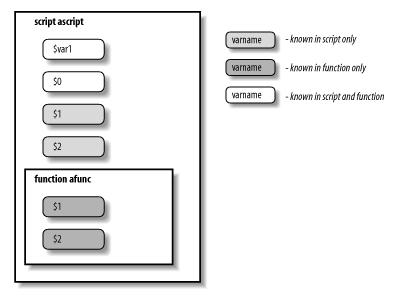
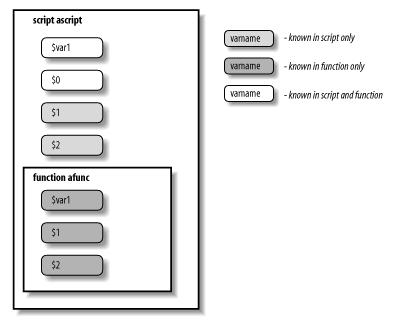
shell> sh var_scope.sh arg1 arg2以下用兩張圖來說明使用「local」關鍵字後,變數範圍的差異:
# 以下為執行結果:
var1: outside function
var_scope.sh: arg1 arg2
in function: var_scope.sh funcArg1 funcArg2
var1: in function
var1: outside function # 果然 script 中的變數沒被 function 所影響到
var_scope.sh: arg1 arg2
| 未用 local 變數 | 使用 local 變數後 |
 |  |
echo $TEST_這時系統會去判斷是否有名稱為「TEST_」的變數,結果當然是沒有,所以會輸出空白! 而為了得到正確的結果,可以在變數名稱旁邊加上左右大括號「{}」,所以只要改成以下語法就正常了:
echo ${TEST}_
function 函式名稱 {或是
......
......
}
函式名稱() {====== 以下為備註 ======
......
......
}
shell> declare -f而 function 跟 script 有何不同呢? 以下分兩點說明:
以下舉幾個使用 type 的例子:type [-aftpP] name [name ...]
With no options, indicate how each name would be interpreted if
used as a command name. If the -t option is used, type prints a
string which is one of alias, keyword, function, builtin, or
file if name is an alias, shell reserved word, function,
builtin, or disk file, respectively. If the name is not found,
then nothing is printed, and an exit status of false is
# 顯示「file」或許平常 type 使用到的機會可能不多,不過或許有天會成為 debug 的利器也說不定喔!
shell> type -t bash
# 顯示「keyword」
shell> type -t if

